Help · AI designer
Plans and tokens
The studio, the cutting maps, drawings, labels and exports work on every plan, including Free. Paid plans add room for more projects, privacy and a few studio features. AI tokens pay for the AI designer and AI renders. Prices are on the Plans page, in your country’s currency.
What each plan allows
To see the plans without leaving your project, click Plans in the studio header (on a phone, ☰ → Plans). The page opens in a window; paying opens a new tab, and your project stays open.
| Free | Hobby | Pro | |
|---|---|---|---|
| Projects in your account | 1 | up to 3 | unlimited |
| Variants of each project | — | up to 2 | up to 2 |
| Earlier versions kept | 1 | 10 | 50 |
| Saved projects | public | private | private |
| Project file (.flatma) | — | yes | yes |
| Your own names for parts | — | yes | yes |
| Making your own parts | — | — | yes |
| AI tokens | 3 when you sign up | 50 a month | 100 a month |
| Ads in the studio | yes | no | no |
- Projects count with their variants as one. When there is no room for another, a new project is still kept in this browser, and a bar over the scene says what to do: free a place in your account or upgrade.
- Public: on Free, saving a project to your account publishes it. It gets a public page and can appear in Flatma community after review. Until you publish, the project is kept on this device only. Hobby and Pro keep projects private. See Publishing.
- Project file: ☰ → Open file… and Save as file. On Free a crown marks them, and clicking opens the plans.
- Your own names: on Free the name field of a part can’t be changed. Names a part already has stay.
- Making your own parts (New part, Make unique) needs Pro. Parts you already have stay and can still be edited, and you can save and use My parts on any plan. See Project parts and My parts.
- Ads show on Free and without an account, as a column on the right of the studio on wide screens. Remove ads at its top opens the plans.
Paying for a year costs less per month than paying monthly. When a paid plan ends, your account goes back to Free; projects over the Free limit stay in your account, but changes to them are kept only on your device until you upgrade again.
Business
Business is the plan for a company on Flatma (see the For business tab on the Plans page). Everyone in a company with Business gets everything Pro gives in the studio, whatever their own plan. The company owner also gets 300 AI tokens a month. The plan adds the company’s tools: its own website with a 3D constructor for clients, offers, a CRM and a place in the Flatma catalog of makers. On the company’s website, clients use the AI without tokens: the company pays from its AI balance.
What AI tokens are for
- AI designer: one question costs one token, however many steps the AI needs. A token is used only when the AI answers. A typical piece of furniture takes about three questions. See Designing with the AI.
- AI render: a photorealistic picture of the view costs a few tokens, depending on the model; the price is on the Generate button. If the render fails, the tokens come back. See AI render.
Everything else in the studio, including cutting maps, drawings and downloads, doesn’t use tokens.
Plan tokens and your own tokens
You can have tokens of two kinds:
- Plan tokens come with Hobby, Pro and Business. They renew at the start of each paid month and don’t carry over: what’s left is replaced by the month’s allowance. When the plan ends, they are gone.
- Your own tokens are the free ones you get when you sign up and the ones you buy. They don’t expire.
Plan tokens are spent first. The tokens button in the studio header shows the total; click it to see both kinds and when the plan tokens renew.
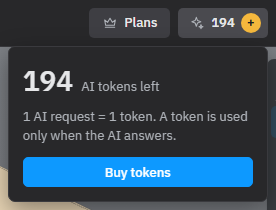
Buy tokens
- Click the tokens button in the studio header, then Buy tokens. You can also use Buy more under the AI field.
- The payment page opens in a new tab; your project stays open. Choose a pack: the bigger the pack, the less each token costs.
- Pay. When you come back to the studio tab, the new balance shows by itself.
Bought tokens are your own: they don’t expire and don’t depend on your plan.
See also: Designing with the AI, AI render, Saving and versions, Project variants.