Help · Parts and assembly
Offsets
An offset is a fixed distance between a face of a part and its reference box. Use offsets for anything that must keep its size when the model stretches: the gaps around doors, the overhang of a tabletop, the clearance for drawer slides.
How an offset works
Each part has a reference box. Without offsets the box is the part itself; once a part has offsets, its reference box is drawn dashed on the scene when you select the part or its group. An offset moves one face away from the box:
- + — the face sticks out past the box, like a tabletop over its legs.
- − — the face stops short of the box and leaves a gap, like a door in its opening.
When the part or its group stretches, the reference box stretches with everything else and the offsets keep their size. A gap between two parts holds its size only when it is an offset; a gap without one is free space and stretches with the rest.
Set offsets
- Select the part.
- At the end of Properties, click Additional settings (with ☰ → Advanced tools on, the block is always visible).
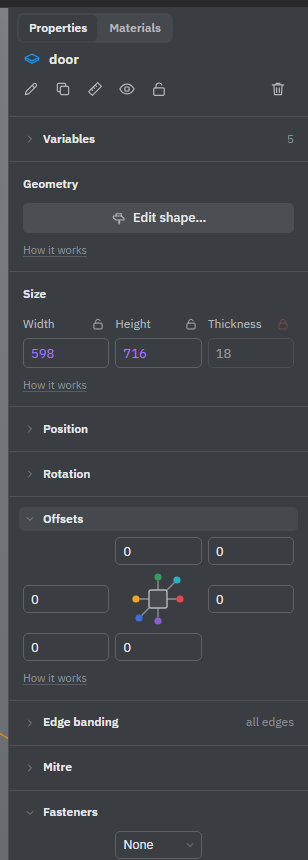
- Open Offsets. It has six fields laid out as a cross: one for each face of the part. Point at a field to see which face it is — Top, Left, Front and so on — as the part stands now.
- Type the offset in a field and press Enter: a positive number for an overhang, a negative one for a gap.
Changing an offset moves that face; the reference box stays where it is. Under the fields, Reference box gives the size of the dashed box. A field is greyed out when the part is locked, that size of the part is locked, or a formula sets the offset. Offsets belong to single parts; a group has no Offsets block.
You can also set an offset on the scene. In the chain of dimensions of a group, a gap held by an offset is grey; click it and type the new gap.
Examples
Door fronts with 2 mm gaps
Make each door as big as its opening, then give it an offset of −2 on every side. The door is now 4 mm narrower and lower than its opening, with a 2 mm gap all round. Widen the cabinet and the doors get wider, but the gaps stay 2 mm. The dimensions on the scene measure to the reference box, so they still show the size of the opening.
A tabletop over its legs
Make the tabletop as wide and deep as the frame of legs, then give it offsets of +20 at the front, back, left and right. It now overhangs the legs by 20 mm on each side. Make the table longer and the overhang stays 20 mm.
An offset on a sheet's face
An offset on the large face of a sheet, along its thickness, can't make the sheet thinner. It is a gap beside the sheet: the whole sheet moves by that much, and the nearest free space takes the difference. Use it for the clearance a drawer needs for its slides: give the drawer side −13 on its outer face and it moves 13 mm away from the cabinet side, while the drawer gets narrower.
If the part's place is set by a formula, an offset puts the face that far from where the formula puts the part.
See also: Groups, Size, position and rotation, Edge banding.