Help · Materials, edges and fasteners
Mitred ends
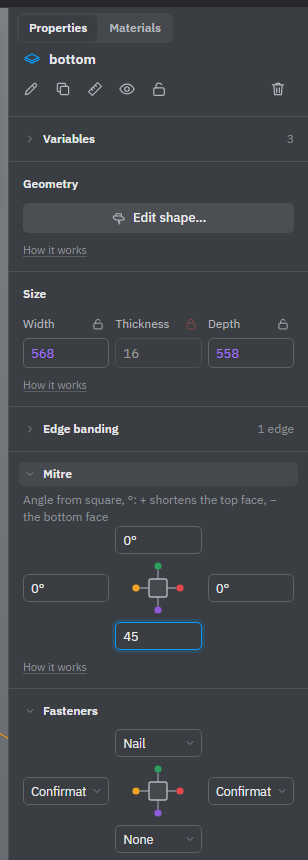
A mitre cuts the end of a sheet at an angle. Two ends cut at 45° meet at a corner with no end grain showing, as on a box or a plinth. You set it per end in the Mitre block.
Mitre an end
- Select a sheet part.
- In Properties, open the Mitre block.
- Type the angle into the field of the end you want to cut, for example
45, and press Enter.
The four fields stand in a cross around a picture of the part, one per end, like the Edge banding block. A field belongs to the part's own end and stays in its place when you rotate the part. Point at a field to see which way that end faces now and how long it is.
The angle is measured from a square end, in degrees, from −89 to 89. 0 or an empty field means a square end: clearing the field removes the mitre.
Which face gets shorter
The end is cut along its whole length. One face of the sheet gets shorter; the other keeps the full length. The sign of the angle picks the face: the line above the fields says it in words, for example "+ shortens the top face, − the bottom face". For a corner, mitre both parts so that their shorter faces end up inside the corner.
Sizes and the cutting list stay the same
The part's size is measured along its long face, so a mitre doesn't change the part's size, the cutting maps or the parts list: the workshop cuts the blank to size and then saws the mitre. The drawing of the part shows it with a callout such as "Mitre 45°", and with Advanced tools on it appears in the Operations list.
A mitre follows the part. Resize the part or give it another thickness, and the cut stays exactly in the corner at the same angle.
Limits
- Only a sheet with a rectangular outline takes a mitre. A panel cut to shape with the jigsaw or a bent sheet can't be mitred; the block says why. Holes, grooves and milling inside the panel don't matter.
- The cut can't eat the whole face: on a thick, short part a steep angle may take off more than the part's length. Then the mitre isn't made and a message at the bottom of the scene says how much it would take off.
- A mitred end is not edge banded: its field in Edge banding reads Mitred.
- A mitred end touches its neighbour only along an edge, so the Fasteners block finds no joint there. A corner of two mitred sheets can't take fasteners from that block yet: it is glued.
- A locked part and parts inside a copy of a library part can't be changed here.
See also: Edge banding, Saw, Drawings.