Furniture CRM: every custom order from enquiry to delivery

Flatma is a furniture CRM for makers of custom furniture: enquiries arrive with the client's 3D project, and each order carries its measurement, design, quote, agreed version, production steps, delivery and payment. One board of stages in the browser, right next to the studio where the project is drawn.

Connect your company →
Works in the browserLinked to 3D projects and quotesFree to connect
Flatma CRM order board alongside drawings, cutting maps and a 3D furniture project

Where custom furniture orders go wrong

The enquiry is in a messenger, the measurements in a notebook, the project in a designer's file, the price in a spreadsheet, and only the salesperson remembers what the client actually agreed to. A month later the client asks for it a little wider, the project gets edited, and the shop cuts something nobody signed off. The mistake shows up at installation, when a remake costs the most. A generic CRM keeps contacts and deals, but doesn't know which parts a wardrobe is made of or which version of the project went into production.

Enquiries, projects and price calculations of a furniture order scattered across e-mail, messengers and spreadsheets

How an order moves through the CRM

The stages of the board are ready from day one: Lead, Measurement, Design, Production, Ready / Pickup, Delivery / Installation, Payment / Closing and Archive.

Step 01

Enquiry

Add an order by hand, or let it arrive from your company site or the Flatma catalog with the client's 3D project, name and phone.

Step 02

Measure and design

Measurement date and address, notes for the stage. The Flatma project is linked to the order, and the quote is built from it with your price list.

Step 03

Agreement and production

When the client accepts the quote or agrees by phone, the order gets a version: a copy of the project and the price. The shop works from it and ticks off its steps.

Step 04

Delivery and payment

Delivery date and address, prepayment and balance due. A closed order goes to the archive with its whole history.

A client designs a wardrobe with the AI designer on a furniture company's site; the request with the project goes to the CRM

Enquiries arrive with the project attached

A custom furniture order starts with what the client wants. With Flatma they can show it in 3D instead of describing it over the phone.

  • Your company site on flatma.pro has a 3D designer: the client builds the piece, clicks Send request, and a lead with their project lands in the CRM. If you show prices, the button gives an estimate from your price list
  • The Flatma catalog of makers: someone designs furniture in the studio, picks your company in their city, and the request arrives marked Catalog
  • The AI designer on your site: the client describes the piece in words and leaves contacts, and the lead is on the board
  • Calls and showroom visits: add the order by hand with client, phone, what to make, deadline and price
  • The client gets a request page: order number, current step, your message and the quote once it's ready
  • Until you open the request, the client can still edit the project, and the update goes into the same order

Requests you haven't opened yet are marked as new, so none gets buried in a chat.

Materials, hardware and parts of a furniture project as they appear in the order card

The order card: everything about the order in one place

Open an order and you don't have to dig through chats to find what was promised, and when.

  • Client, phone, what to make, deadline and price in your company's currency; fields are saved as you type
  • Fields and a note for each stage: measurement date and address, delivery date and address
  • Flatma projects linked to the order, opening in the studio with their drawings and cutting maps
  • The Production tab: sheets, profiles, edge banding and hardware from the project data
  • Your own production steps, up to six (cutting, painting, assembly…), ticked off right on the card
  • Prepayment and balance due
  • History: who changed the stage and when, when the quote was sent, what the client answered

Search finds an order by client, phone, what to make or number. On a phone the board opens as a strip of stages, with no app to install.

Quote insights for a furniture order: deal probability, visits, time on each block and tips for the salesperson

Quotes and the price list, straight from the order

The Design tab of an order has a New offer button. Nobody types the quote lines again: they come from the project.

  • Up to three options in one quote, each with its own project and 3D model
  • Materials, edge banding, hardware and work (cutting, holes, milling, bending) taken from the project data
  • Prices from your company price list with your markup; a price you type by hand is remembered for the next quotes
  • Your own lines (delivery, installation, any service) and optional items the client ticks
  • The order shows the deal probability from how the client reads the quote, plus a tip on what to do next
  • Client remarks pinned right on the parts of the 3D model

The interactive 3D quote has its own article. What matters here: the quote lives inside the order, and whatever the client does with it lands in the order history.

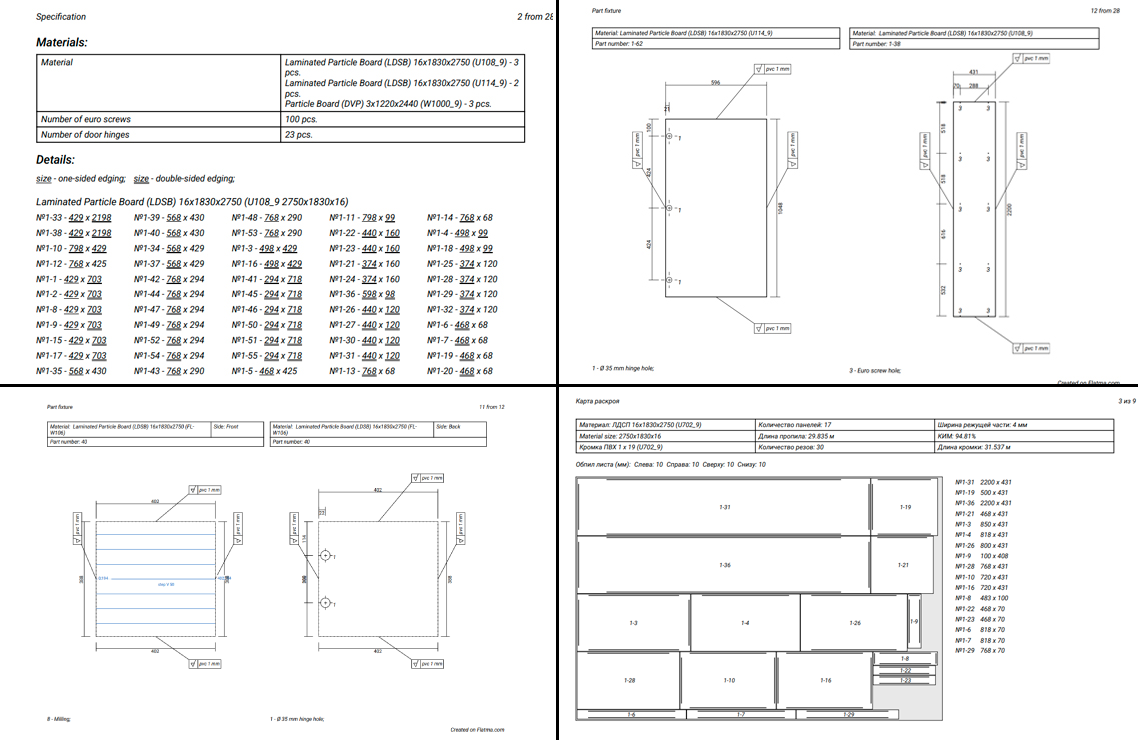
Specification, drilling drawings and a cutting map made from the agreed version of a furniture order

The shop builds what was agreed

The classic custom furniture problem: the project keeps changing after the deal is made. In Flatma the agreement is fixed as an order version.

  • The client accepts an option on their quote page, or you record it with Client agreed…: by phone, in person, in writing or by contract
  • An order version is its own copy of the project, its parts and price. Edit the working project freely: the version doesn't change
  • Start production after checking materials, lead time and prepayment; drawings, cutting maps and part labels come from that copy
  • If the project changes after the agreement, the CRM warns you and shows any change in overall size
  • Change order sends a proposal: what differs from the agreed version and the new total. Once the client agrees, you switch production to it
  • If only production details change and the price stays the same, no client approval is needed

The client has one link for the whole deal, showing whether the order is accepted, in production or waiting for their agreement to a change.

Spreadsheets, a generic CRM or the Flatma CRM

How tracking furniture orders differs in a spreadsheet, in an ordinary CRM and in Flatma.

Excel and messengers
Generic CRM
Flatma
Orders by stage on one board
✕ Spreadsheet rows, statuses by hand
✓ Yes, after you set up the pipeline
✓ Stages from lead to archive ready to use
Enquiry from your website
✕ Copied from e-mail and chats
✕ Form text without a project
✓ A lead with the client's 3D project
3D project in the order
✕ Files in folders and chats
✕ An attached file
✓ A linked Flatma project that opens in the studio
Materials and hardware for the shop
✕ Counted by hand
✕ No
✓ From the project data
Quote
✕ A document made by hand
✓ A document template
✓ A 3D page priced from the project and price list
What the client agreed to
✕ The last file in the chat
✕ Deal and project kept apart
✓ An order version: a copy of the project and the price
Getting started
✓ Right away, but all by hand
✕ Fields and stages to set up first
✓ Connect your company in two steps

Who the Flatma CRM is for

The CRM isn't tied to a product type: your company names its own production steps and quote sections.

Furniture workshops

Cutting, edge banding and drilling as steps on the order card; materials and hardware come from the project.

Kitchens and wardrobes to order

Measurement, design, a quote with options and an agreed version, without sending files back and forth.

Turnkey furniture

Materials, making and quality check as steps, then delivery and installation, prepayment and balance.

Panel cutting and parts to order

Requests with the client's project from the Flatma catalog: parts, sheets and edge banding are visible at once.

Small workshops

Start for free on the Start plan. When orders grow, Business removes the monthly limit.

Not only furniture

Stairs, metalwork, shop fittings: the same stages, with your own production steps and quote lines.

Furniture CRM: frequently asked questions

A system for tracking orders where each order has a stage, a client, dates, money and the project of the piece itself. In Flatma it's a board from lead to archive, linked to 3D projects, quotes and your price list.
A generic CRM keeps contacts and deals. In Flatma the order holds the project itself: quote lines and the shop's materials and hardware come from it, and the agreed version fixes exactly what to make.
Yes. Connecting a company is free on the Start plan, which has a monthly limit on orders. Business removes the limit and lets clients accept a quote online; prices are on the Plans page.
Yes: client, phone, deadline, price and stage notes work without a project. Materials for the shop, quote lines and order versions come from a Flatma project, so the CRM is most useful together with the studio.
Each request has a page on your company site with its number, its step (from Request sent to In production and done), your message and the quote. You send the link yourself: the system doesn't send e-mails or SMS.
Yes, with Change order: the client sees what differs from the agreed version and the new total. Until they agree, the shop keeps working from the previous version.
Choose a language
Unified Account
Sign Up
E-mail
Password
By clicking the 'Sign Up' button, you accept the terms of the
User Agreement
Already registered? Log In
Log In
E-mail
Password
Sign Up